Already using Overscan? Sign in
 Overscan guide
Your first issue today, then teach Overscan by replying in plain words.
Running your own briefing should never take a manual, so this one is short. Your first issue in three answers, every change in your own words by email, and exactly what lands in your inbox each morning.
Not a customer yet: see what Overscan does for your business.
Your first issue, in three answers
Your first issue can be in your inbox today. After our call I email you one sign-in link: open it and press Get started. There is no password. The link works once; if it runs out, ask me for a fresh one.
Three short questions follow, and we can answer them together on the call:
- What do you want to follow? Say it the way you would tell a friend: who your customers are, and what they should hear about first.
- Where and when? By email and on a web page, or on the web page only. How often, what time, and your time zone.
- Where should we start looking? Websites, feeds or keywords, one per line, or tick a starter set.
Press Make my newsletter. For the first issue today, open Issues in the top menu and press Make an issue now. Overscan starts on it within ten minutes and emails it to you (or keeps it on the web page, if that is all you picked).
Bookmark the page you land on. Signed out later? Type your email on the sign-in page and a fresh link arrives by email.
Hit reply. The next issue listens.
Teach Overscan the way you would teach a new hire: reply to any issue in your own words. Overscan answers in the same thread with what it understood, and the next issue follows it.
Longer please. More on the new rules, less on trade shows.
Got it. Your issues will be the usual length from the next one.
You'll see more on the new rules from the next issue.
You'll see less on trade shows from the next issue.
Changed your mind? Just reply UNDO.
All your settings are here: (a link to your page)
An example reply, and the answer in Overscan's own words, back in the same email thread.
What a reply can change:
- Length: shorter, longer, or how many stories.
- Topics: more of one thing, less of another.
- What matters to you: a new sentence about your customers, or a better one in place of an old one.
- Websites: paste a link to add it, name one to drop it, name it again to bring it back.
- Tone and layout: how it sounds, how each story is laid out, an emoji on each heading.
- Extras: add or drop the audio, the slides or the video.
Reply UNDO on its own to take back the last change. Reply from the address your issue goes to: Overscan acts only on replies from you, and a forward to a colleague changes nothing.
A reply cannot move the days or the time your issue arrives. Change those on the Brief page in the top menu, under When it arrives. Changes you save on that page, every reply, and every website you turn off or back on are listed at the bottom of it.
Read it, skim it, hear it, watch it, flip it.
Take each issue the way your morning allows. Overscan crafts it once as a letter, and can turn the same issue into an audio overview, a short explainer video and slides. Pick the one that leads your email; the extras you turn on play on the issue's page in your account.
The whole letter in your email.
A short email with a link to read it on the web.
The audio overview on top, then the letter.
The short explainer video on top, then the letter.
The slide deck on top, then the letter.
The whole issue on one screen, as a format of its own once it is reliably accurate. Today you can tick Infographic under Extras and see it on the issue's page when it passes its check.
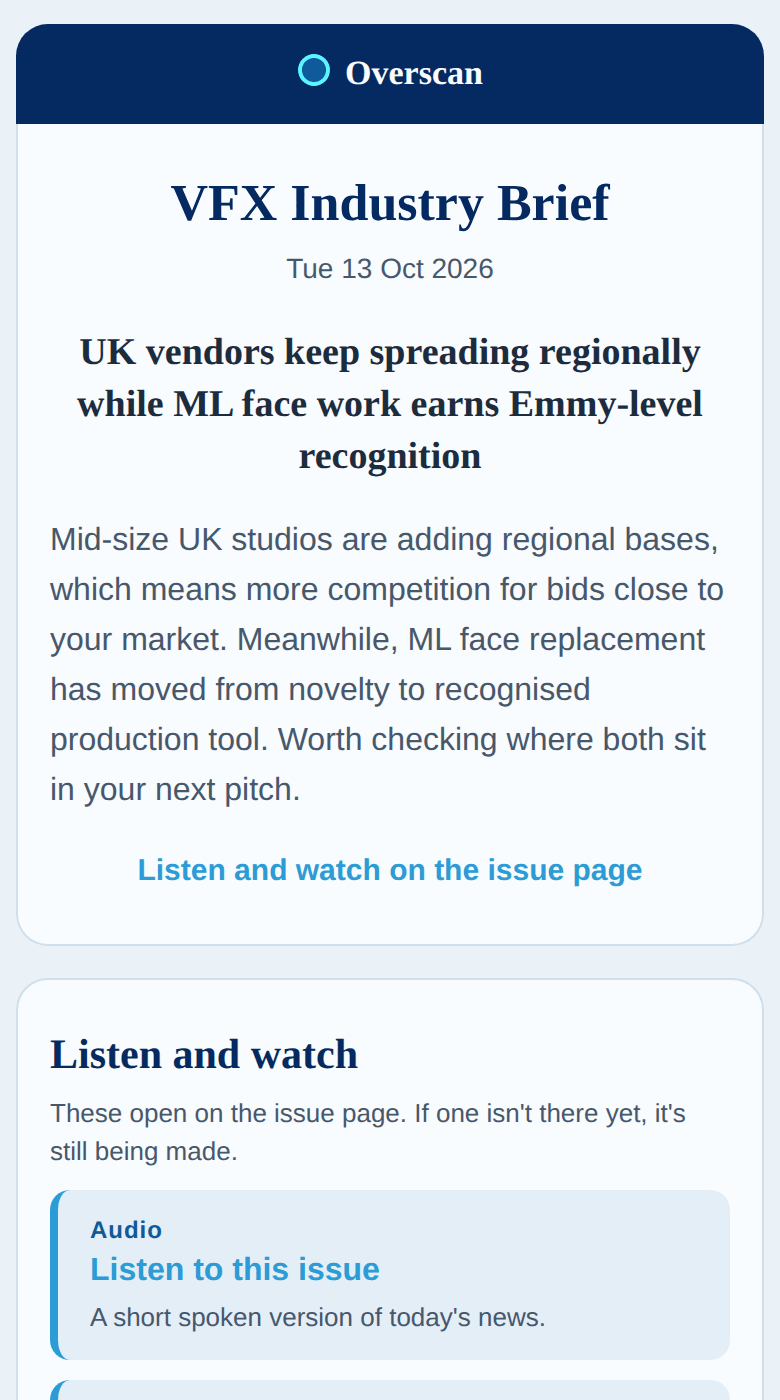
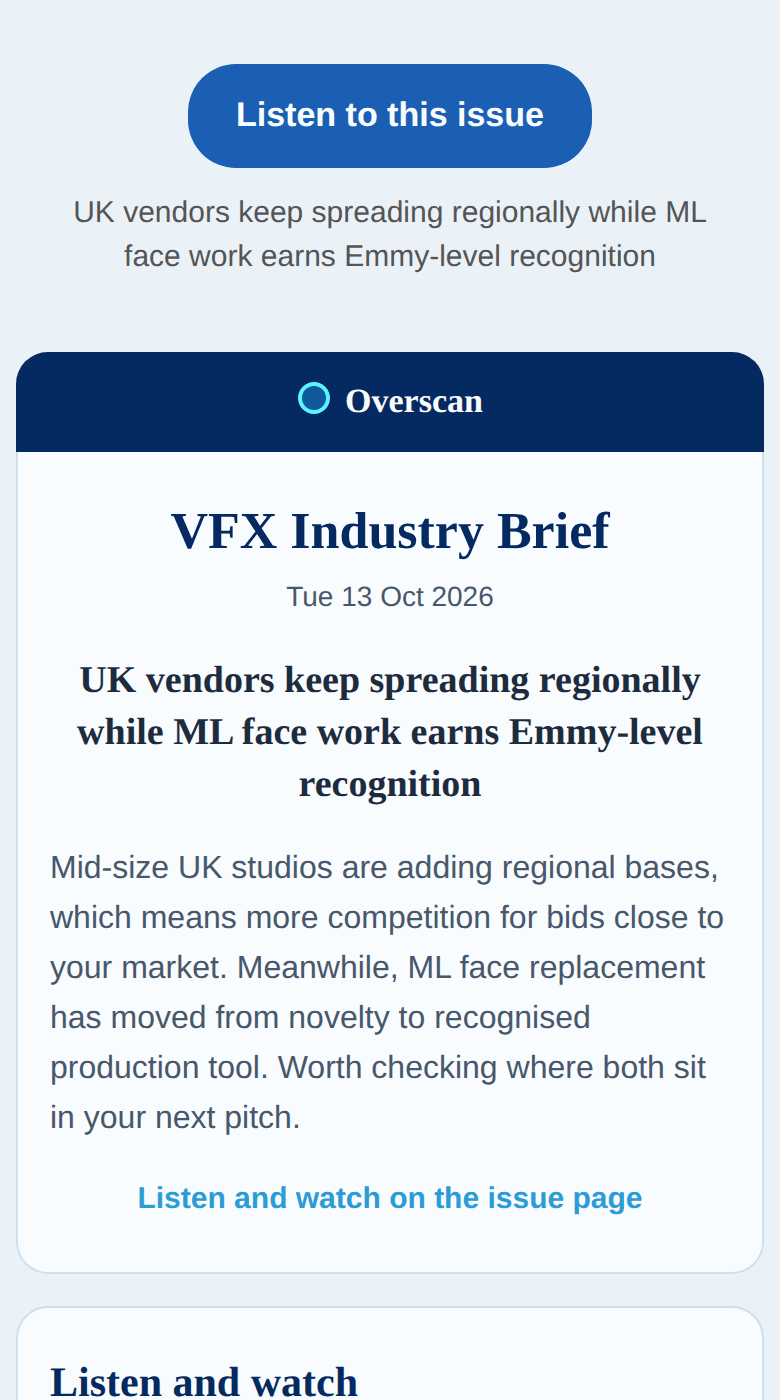
Two of the ways the same 13 Oct 2026 issue of my own VFX briefing lands on a phone. Tap either to see it full size, and hear, watch and flip that issue on the Overscan page.
Pick yours. Tell me which one should lead your email and I switch it for you, any time. Every extra starts switched off: tick the ones you like on the Brief page under Extras, or reply "add the slides". The list also offers Simple podcast, a plainer spoken version, and Infographic, the whole issue as one picture.
When a piece is missing. Each week you get up to two of the audio overview, video, slides and infographic. Once those two are used, audio still comes, as the plainer spoken version, and slides, video and the infographic wait until next week. If the piece that leads your email is the one missing, you get the full letter with one line saying so. Every piece has to pass a check against the stories before it is shown; while yours is still being checked, Overscan holds your copy for it, for up to a few hours.
Your customers. Today the issue and its extras come to you, and you copy what you like into the tool you already use. Forward the whole email and you pass on your own Pause this newsletter link with it. Each customer picking their own is coming, below.
Turn off a website in one tap. Turn it back on in one more.
You decide where Overscan looks. Open Sources in the top menu: every website, feed, forum and channel on your list has a Turn off button. Press it and Overscan drops that one, and never adds it back by itself. Turn back on brings it straight back. Delete takes it off your list.
Or reply "drop" with the site's name, and Overscan confirms you won't see anything from it any more.
Overscan also finds new websites your stories came from. They show up marked Added for you, and the next issue lists them at the top under "New sources for you": one Overscan added comes with a way to remove it, and one Overscan has already paused as not useful just says why, since it is off already. Turn one back on yourself and it stays on, marked Kept on, unless it stops answering or starts sending junk.
Away for a week? Pause this newsletter at the bottom of every issue stops it, and the same page starts it again.
What lands in your inbox, and why you can trust it
At the time you picked, Overscan turns the day's news in your trade into one issue with your newsletter's name on it.
- Overscan catches anything new from every website, feed, forum and channel you follow.
- Overscan keeps what matters to your customers. A story you have already had stays out, unless something changed. Then it comes back marked as an update.
- Most stories carry a short line on why they matter to your customers, and every story links to the original.
- Every link is tried before the issue goes out. A story whose only link is dead is left out, and a line at the foot of the issue says how many links were checked, how many were dead, and any Overscan could not check.
- Your copy arrives by email, from Overscan, unless you picked web page only. Nothing to press. Every issue is also kept on the
Issuespage. - Audio, video and slides follow on the issue's page once they pass their check.
If your account reaches its monthly writing allowance, issues pause until the next month, and your pages say so.
Not built yet, and we say so
- Email straight to your customers coming
Issues sent from your own address (for example news@yourbusiness.com), with a dated record of each customer's yes and one-click unsubscribe. - Each customer picks their format coming
Read it, Skim it, Listen, Watch, Slides or See it, from a link at the bottom of every issue they get. - See it as a format coming
The whole issue on one screen, for the person who will not read, once it is reliably accurate. - Your issue on Telegram or Slack coming
Today it comes by email and on the web. - Sign up on your own coming
Today we set it up with you.
Anything unclear, email me at geoff@thevfxsupervisor.com. I read every message myself.